The Decision Layer for AI
Send in information, get back a decision — without paying for an LLM.
Build applications and AI agents that make structured, auditable decisions without invoking a large language model for every event.
Built for developers. Priced per decision, not per token.
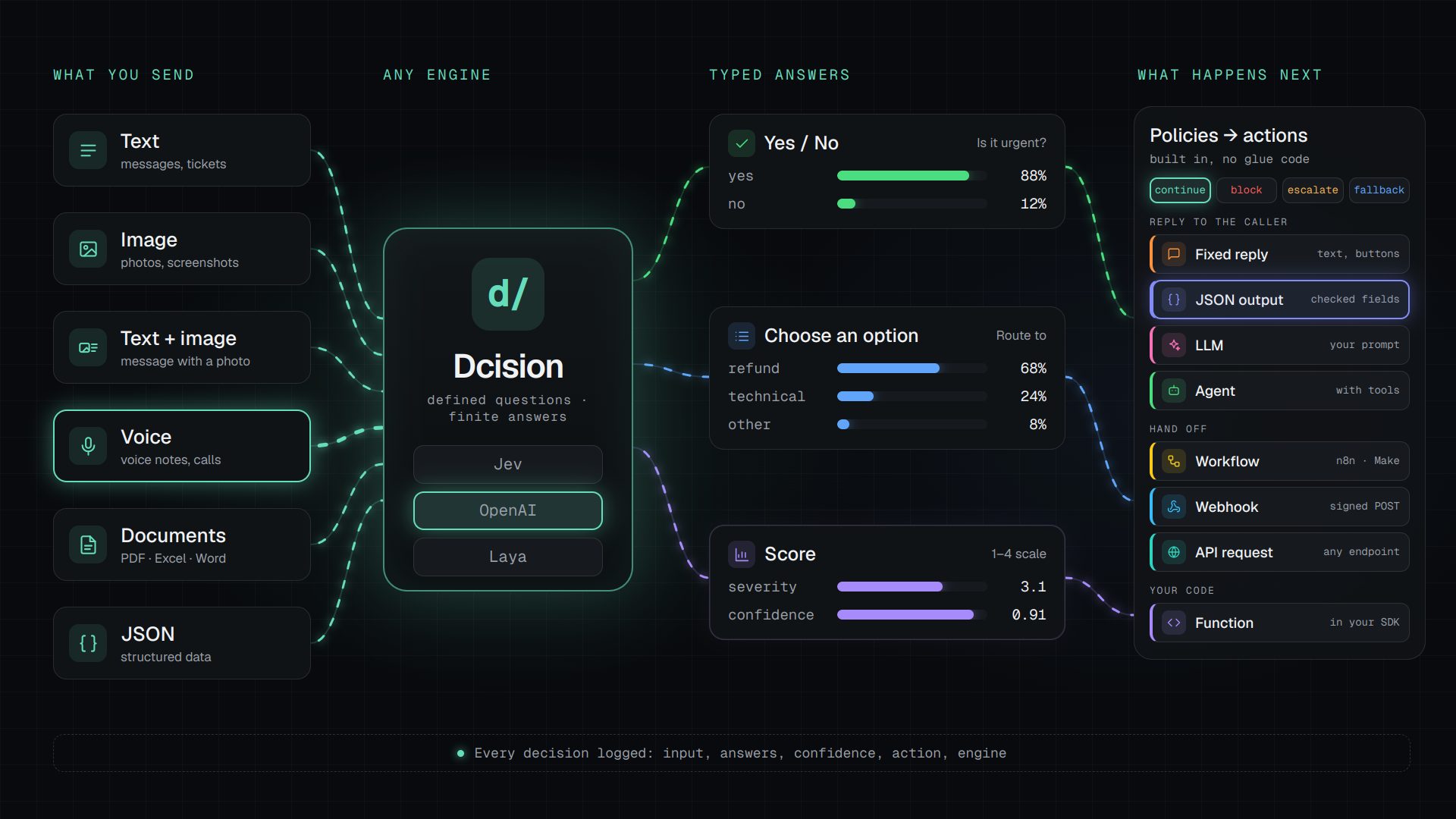
- 01
Send
Text, JSON, images, voice notes and documents (PDF, Excel, Word…)
- 02
Decide
On Jev, OpenAI Decisions or Laya — per workspace or per decision
- 03
Answer
Yes / no, one option, a score — each with its probabilities
- 04
Act
Policies pick continue, block, escalate or fallback; destinations carry it out
Dcision decides what happens before the agent.
Manifesto
Why Dcision.
AI is moving from writing answers to making decisions inside software. Decision engines — Jev, OpenAI's Decisions API, Laya — made the answer typed and measurable. We build what turns that answer into a decision a company can run, trust and audit.
- 01
Decisions are software, not prompts.
A decision is a schema with typed questions, versioned and deployed like code — not a paragraph hidden in a prompt.
- 02
The engine is a choice, not a lock-in.
Jev, OpenAI Decisions or Laya, per workspace or per decision. Engines improve every month; your decisions shouldn't have to be rewritten each time.
- 03
Every input deserves a decision.
Text, JSON, images, voice notes and documents. The world doesn't arrive as clean text, so the decision layer shouldn't expect it.
- 04
An answer is not an action.
A probability doesn't route a ticket. Policies turn answers into continue, block, escalate or fallback, and destinations carry them out.
- 05
Uncertainty is a feature.
Confidence is part of every answer. When it's low, the decision says so and hands the case to a person or a bigger model — on purpose, not by accident.
- 06
Every decision leaves a trace.
Input, answers, confidence, action, engine and version, for every run. What can't be audited can't be automated.
- 07
Machines decide first; people decide what matters.
Millions of microdecisions run machine to machine, so people spend their time on the few that need judgment.
Engines answer. Dcision decides — and acts.
Why Dcision
Engines answer. Dcision decides — and acts.
Jev, OpenAI Decisions and Laya are decision engines: they answer typed questions with probabilities. Call one directly and everything around the answer is your code. Dcision is that layer, on whichever engine you choose.
Typed answers
Dcision
The same three on any engine, on one confidence scale- Jev direct
- Choice, score, probability
- OpenAI Decisions direct
- Choice, score, predicate
- Laya direct
- Choice, score, probability
Inputs
Dcision
Text, JSON, images, voice and documents — on every engine- Jev direct
- Text and JSON
- OpenAI Decisions direct
- Text and images
- Laya direct
- Text (512–1,024 tokens)
Engine choice
Dcision
Jev, OpenAI or Laya per workspace or per decision, compared side by side and in shadow mode before you switch- Jev direct
- Jev only
- OpenAI Decisions direct
- gpt-6-luna only
- Laya direct
- Laya checkpoints
Policies and fallback
Dcision
continue / block / escalate / fallback, minimum confidence per question, reserved "other"- Jev direct
- You code thresholds and actions
- OpenAI Decisions direct
- You code thresholds and actions
- Laya direct
- You code thresholds and actions
What happens next
Dcision
8 destination types: reply, JSON, LLM, agent, workflow, webhook, API request, function- Jev direct
- You wire every system
- OpenAI Decisions direct
- You wire every system
- Laya direct
- You wire every system
Versions and deploy
Dcision
Immutable versions; deploy without redeploying your app- Jev direct
- Questions live in your code
- OpenAI Decisions direct
- Questions live in your code
- Laya direct
- Questions live in your code
Build and test
Dcision
Visual builder, chat builder, Playground and templates- Jev direct
- API only
- OpenAI Decisions direct
- Playground
- Laya direct
- Python library
Logs and analytics
Dcision
Every run logged — input, answers, confidence, action, engine — with calibration hints- Jev direct
- Provider usage only
- OpenAI Decisions direct
- Provider usage only
- Laya direct
- You build them
Integrations
Dcision
REST, a webhook URL per decision (files included), MCP server, GPT-Live delegation, TS/Python SDKs and CLI- Jev direct
- HTTP API
- OpenAI Decisions direct
- SDKs in 6 languages, GPT-Live voice
- Laya direct
- Python, your own server
Where data runs
Dcision
On the engine you choose — with Laya, your server- Jev direct
- TypeSafe's cloud
- OpenAI Decisions direct
- OpenAI's cloud (ZDR, US/EU residency)
- Laya direct
- Your server
Engine price
Dcision
Per decision; Jev on Dcision's key included, or bring your own key- Jev direct
- US$0.042 per 1M input tokens
- OpenAI Decisions direct
- US$0.10 per 1M input tokens
- Laya direct
- Your hardware
Engine facts as published by TypeSafe, OpenAI and Convai Innovations in October 2026. Dcision runs these engines — it doesn't replace them. TS/Python SDKs and the CLI are in the repository, not yet on npm/PyPI.
Why use it
Intelligence you can build on.
The models are smart enough. What's missing is a way to put that intelligence inside software — as a typed primitive running next to your code, not a chat that needs a human watching.
Even the most complex software is built from simple logic and layers. Decisions should be one of those layers: small, typed, inspectable, and trusted enough to run deep inside your systems.
- 01
Use before and after the LLM
Before: Dcision classifies, scores and routes every event, so the expensive reasoning only runs where it is needed. After: it checks what an LLM or agent is about to send — grounded, safe, on policy — and blocks or escalates it before it reaches anyone.
- 02
Not everything needs an LLM
Routing a ticket, scoring a lead or flagging a transaction is a microdecision, not an essay. Answer it with a typed decision instead of a prompt and free text.
- 03
Eliminate hallucinations
Every answer must be one of the options, a score or a probability you declared in the schema, validated before it reaches your code. No invented labels, missing fields or text to parse — and when confidence is low, your policy blocks, escalates or falls back.
- 04
Faster than an LLM*
Decision engines answer structured questions without generating long text, and every question in a decision is evaluated in a single call — extra questions add little latency.
- 05
Built for machine-to-machine
Typed JSON in, typed JSON out, with a confidence and an action on every answer. It's the format APIs, agents, workflows and automations already speak — no human reading in between.
- 06
Managers in control
Every run is logged with its version, confidence and action. Managers follow the indicators in the dashboard and adjust options, thresholds and destinations in the Decision Builder — each change becomes a new version, with full history.
LLMs reason. Agents act. Dcision decides — first.
* TypeSafe publishes up to 200× faster for Jev against frontier LLMs (an independent test by Every measured about 25×); OpenAI publishes about 10× faster than its Responses API for Decisions. Real gains depend on the case. On Dcision, a decision usually takes about 1–2 s end to end, network included.
The problem
Most LLM answers are money burned.
AI applications are using large models for small decisions. The result: high cost, latency, low predictability and unnecessary reasoning.
Without a Decision Layer
10,000,000 events
10,000,000 LLM calls
With Dcision
10,000,000 events
500,000 LLM calls
LLM calls
−95%
Output
Typed JSON
Integration
1 API
| Capability | LLM | Dcision |
|---|---|---|
| Cost / 1M decisions | $300 and up | ~$24 incl. fallback |
| Output | Unstructured text | JSON validated against your schema |
| Confidence | Not built in | A confidence for every answer |
| Next step | Parsed from free text | Policies: continue, block, escalate or fallback |
| Audit trail | Prompts and free text | Version, action and reason for every execution |
* Illustrative example assuming 5% of decisions fall back to your own LLM — not a performance claim.
How it works
Decide before you reason.
- 01
Send State
Any event, message or JSON context from your app or agent.
- 02
Define Decisions
Choice, Score and Probability questions in a versioned schema.
- 03
Execute
The runtime validates the state and answers every question in one engine call, usually in about 1–2 seconds.
- 04
Act
Get typed answers and an action — continue, block, escalate or fallback — plus the per-outcome actions you configure.
- continue
- block
- escalate
- fallback
The next action, without and with Dcision
Automation or agent without Dcision
- Tokens burned on every decision, even trivial ones
- Unstable format: free text to interpret
- Risk of hallucinating the action or the answer
With Dcision
Calls only what's needed
- Agent
- LLM
- API
- Workflow
- Webhook
Or answers directly
- Text
- Probability
- Yes / No
- No LLM tokens spent to decide
- Answer validated by your schema
- The LLM only steps in when the answer calls for it
Decision Schema • lead-qualification (abridged)
{
  "stateSchema": {
    "kind": "object",
    "fields": [
      { "key": "message", "type": "string", "required": true },
      { "key": "company_size", "type": "number" },
      { "key": "source", "type": "string" }
    ]
  },
  "questions": [
    { "key": "purchase_intent", "type": "probability",
      "instructions": "Does this lead have real intent to buy in the next 30 days?" },
    { "key": "priority", "type": "score",
      "instructions": "How urgent is it to answer this lead?",
      "scale": ["low", "medium", "high", "critical"] },
    { "key": "route", "type": "choice",
      "instructions": "Which team should receive this lead?",
      "options": [{ "value": "sales" }, { "value": "sdr" },
                  { "value": "nurture" }, { "value": "spam" }] }
  ],
  "policies": [
    { "field": "route", "on": "output", "operator": "eq",
      "value": "spam", "action": "block" },
    { "field": "purchase_intent", "on": "confidence", "operator": "lt",
      "value": 0.6, "action": "escalate" }
  ]
}
What you get
- Schema-validated inputs
- A confidence for every answer
- Policies & guardrails
- Versioned + observable
- Per-outcome actions (Destinations)
Decision API
One endpoint. Typed answers.
Publish a decision and call it like any other API. Typed contract, versioned schemas, idempotency and standardized errors.
curl https://api.dcision.io/v1/decisions/lead-qualification \
  -H "Authorization: Bearer $DCISION_API_KEY" \
  -H "Content-Type: application/json" \
  -d '{
    "state": {
      "message": "I need pricing for 500 users, ASAP. Can we do a call tomorrow?",
      "company_size": 500
    }
}'Press “Run decision” — the response below comes from the real Dcision API.
- Versioned Decision Schemas
- Idempotency-Key support
- Rate limits & standard errors
- OpenAPI 3.1 spec
Official TypeScript and Python SDKs are coming soon. Until then, call the API over plain HTTP, as above.
Engines
Engine-agnostic by design. Jev, OpenAI and Laya today.
Decision schemas don't name an engine. Run decisions on Jev, TypeSafe's System One model, with Dcision's key or your own; on OpenAI Decisions with your OpenAI key; or on Laya, an open-source decision model on your own server. Per workspace or per decision.
- Today
Jev · System One
Calibrated answers instead of generated text
- Today
Laya · open source
Apache 2.0 decision model on your own server
- Today
OpenAI Decisions
gpt-6-luna on your OpenAI key — images included
- Today
Your own key
TypeSafe, OpenRouter or Vercel AI Gateway
- Today
Human
Escalate low-confidence cases to your team
- Roadmap
Rules
Checks without a model call
Dcision is not a Jev wrapper.
Jev was the first engine, Laya the second and OpenAI Decisions the third. Around them, Dcision adds the Decision Schema, the Decision IR, the runtime, policies, Destinations and execution logs: the layer that makes decisions typed, auditable and portable.
Decision Schema
A JSON state schema with typed questions and policies. Not prompts.
Decision IR
An engine-neutral representation: only the engine adapter speaks to the model.
Runtime + Policy
Validation, policies (continue / block / escalate / fallback), Destinations and logs.
Engine alone vs Dcision
Beyond the engine.
Jev, OpenAI Decisions or Laya — with everything around the engine that takes decisions to production: schemas, builder, fallback, destinations, monitoring and tools.
The main difference
An action for every answer.
Engines answer. Dcision acts. On each option, level or threshold of a decision, pick what happens next — without writing the glue code.
When action = allow
Answer the caller
Fixed reply
Returns a ready message (text and buttons) — no model call.
Structured output
Returns a JSON object checked against your fields — built from the result, or extracted by an LLM.
LLM
A model answers with the route's prompt, using your OpenRouter or Vercel AI Gateway key.
Agent
Your agent answers with the route's instructions and tools — wait for the reply or hand off.
Hand off
Workflow
Triggers n8n, Make, Zapier, Pipedream or any workflow URL with the route's variables.
Webhook
Dcision POSTs the signed result to your URL, with retries for about 7 hours.
API request
Calls any API: method, URL, headers and a JSON body with variables.
Your code
Function
Your code runs it: the response names the function to call.
Features
Everything an engine alone leaves to you.
Whichever engine you use — Jev, OpenAI Decisions or Laya — the difference is everything you don't have to build, maintain and monitor around it.
Act
- Actions per result8 destination typesPer option, level or threshold: fixed reply, structured JSON output, LLM, agent, workflow, webhook, API request or function — signed deliveries with retries
Engine alone (API)
You wire each result to the next system yourself - Webhook triggerOne URL per decisionEach decision gets its own webhook URL: forms, CRMs, n8n, Make or Zapier run it without an API key, with an optional signing secret and live testing
Engine alone (API)
You expose an endpoint and call the engine from it
Build
- Decision schema dashboardEvery decision in one dashboardThe whole workspace in one place, with immutable versions and full history
Engine alone (API)
Questions live in your code - Decoupled viewChange decisions without a redeployDecision Schema and Decision IR keep the decision apart from the app and the engine: deploy a new version without redeploying your app
Engine alone (API)
Decision logic mixed into the app code - Visual builderVisual editor + PlaygroundDecision Builder with form and visual editors, JSON preview and a Playground
Engine alone (API)
Questions written by hand - Template libraryReady-made templatesLead qualification, support routing, spam, agent routing, RAG relevance and more
Engine alone (API)
Start from a blank page
Operate
- Fallback per questionConfidence threshold per questionMinimum confidence per question and a reserved "other" option: below the threshold, the policy applies your fallback action
Engine alone (API)
You read the confidence and decide what to do - Monitoring and analyticsOverview and calibrationOverview tab with volume, p50/p95 latency, errors, estimated cost and calibration suggestions; every run logged
Engine alone (API)
You build the logs and metrics
Tools for developers and agents
- CLIComing soonDecisions from the terminalinit, validate, decide and templates from the terminal (built, not yet published)
Engine alone (API)
— - MCPFor agents and Claude CodeRemote MCP server at api.dcision.io/mcp: agents list, inspect and run decisions, validate schemas and use the templates — plus a Claude Code skill
Engine alone (API)
—
* Compared with integrating a decision engine's API — Jev, OpenAI Decisions or Laya — directly in your own code; features of each provider's own console or playground are not considered.
Use cases
One API for millions of microdecisions.
AI Agents
Which agent takes this task?
ROUTE = research_agent
Customer Support
Department, urgency, human needed?
ROUTE = BILLING
Sales
Purchase intent and priority.
INTENT = 0.94
Payments
Fraud screening before execution.
RISK = LOW
Content
Moderation before content goes live.
ACTION = BLOCK
RAG
Is this chunk relevant to the query?
RELEVANCE = 0.88
LLM Routing
Does this need a frontier model?
ENGINE = small
LLM Guardrail
Is the agent's answer safe to send?
GROUNDED = 0.12
Platform
Everything you need for Decision as a Service.
Decision Builder
Form and visual editors, with a JSON preview.
Decision Schemas
JSON state schema + typed questions.
Playground
Test drafts with real data; runs are never billed.
Engine adapters
Jev, OpenAI Decisions and Laya — the engine is a choice, not the product.
Decision Runtime
Validation, IR, policies, execution logs.
Observability
Executions, p50/p95 latency, errors and cost.
Versioning
Immutable versions on every deploy, full history.
Destinations
Per-outcome actions: webhooks, API calls, workflows, LLM or agent replies, fixed replies, or functions in your code.
Teams
Roles, e-mail invitations and multiple workspaces.
Proof of Decision
Verifiable attestation (future).
Observability
Every decision, measured.
Volume, p50/p95 latency, errors and estimated cost per decision — and every execution logged with its version, confidence and action.
- Decisions this month
- 0
- Median latency
- —
- Escalated or blocked
- —
- Avg. cost per decision
- —
Live data is temporarily unavailable.
Real numbers from the public demo workspace — the decisions run from this page.
Pricing • US$ per 1M decisions
Pay for decisions. Not tokens.
A flat price per successful decision, whatever its number of questions. No token billing, no “unlimited” without limits.
Base price −20% on annual • Price per 1M with credits unchanged
Genesis
Early accessFree
$0 • past 1M, keeps running on prepaid credits
- Included
- 1M / month
- Extra, with credits
- $12 / 1M
- 2 decision schemas
- Playground access
- API keys + 7-day logs
- Rate limit 60/min
Join GenesisBeta • no credit card
Developer
For builders$29/mo + usage
- Included
- 2.5M decisions
- Extra, with credits
- $12 / 1M
- 10 decision schemas
- 14-day logs
- Rate limit 300/min
- Credits with auto recharge and spend cap
- Email support
Growth
For production$199/mo + usage
- Included
- 10M decisions
- Extra, with credits
- $9 / 1M
- Unlimited decision schemas
- 30-day logs
- Rate limit 2000/min
- Lower price per extra decision
- Priority support
Start GrowthExtra decisions paid with prepaid credits
Enterprise
100M+ decisionsCustom
Committed volume, contracts
Custom pricing • committed volume • invoicing
- Committed volume from 100M decisions / month
- Custom rate limits
- Log retention up to 365 days
- Contract, invoicing and DPA
- Dedicated support
Talk to foundersContracts • invoicing • DPA
Comparison in US$ • 100% LLM vs Dcision
Live calculatorSee your savings at scale
100% LLM (mini-class)
$3,000
$300 / 1M
Dcision + 5% fallback
$240
$9 per 1M (Growth, paid with credits) + your LLM for the fallbacks
92% savingYou save $2,760 / month at 10M decisions
Usage cost only (plan base fee excluded). Dcision = $9 per 1M on Growth + 5% of decisions returning the fallback action, which your code sends to your own LLM at $300 per 1M ≈ $24 per 1M. Illustrative assumptions: your LLM cost and fallback rate will vary.
Included in every plan
No token billing
Flat price per successful decision, not per token
Typed JSON
Schema-validated answers, each with a confidence
Destinations
Per-outcome actions: webhooks, API calls, workflows, LLM or agent replies, fixed replies, or functions in your code
Teams
Owner, Admin, Member and Viewer roles, with e-mail invitations
Usage and logs
p50 / p95 latency, errors and estimated cost
FAQ
What counts as a decision?
One successful API call that runs a deployed decision, whatever its number of questions. Playground runs and calls that end in an error are never billed.
What happens past the included decisions?
Every plan keeps running on prepaid credits, at the plan's price per 1M decisions: $12 on Genesis and Developer, $9 on Growth. Genesis too — past its free 1M decisions a month, no subscription needed. Subscriptions are charged their base price only: nothing extra on the invoice. Without credits, calls past the included volume pause (HTTP 402) until you add credits, upgrade or the cycle resets.
How do credits work?
Add a card and get $20 in promotional credits, valid for 90 days (once per workspace and per card; adding a card charges nothing). Buy more by card, from $10 to $1,000 at a time — paid credits never expire. Optional auto recharge tops up your balance when it runs low, and an optional spend cap limits what credits pay per billing cycle.
What is fallback?
When a decision isn't confident enough, a policy can return the fallback action, and your code — or a Destination you configure, such as an LLM call with your own key — handles the case. The LLM call is billed by your provider, not by Dcision. The savings estimate assumes a 5% fallback rate.
How is pricing sustainable?
Engine cost, infrastructure and support are our cost of goods. We charge a flat price per successful decision — never per token — and may adjust prices as we learn real engine costs, with advance notice on paid plans.
Is Dcision a Jev wrapper?
No. Jev is one of three engines Dcision runs, next to OpenAI Decisions and Laya. Dcision is the decision layer around them: schemas and versions, any input (text, images, voice, documents), policies, destinations, the Playground and execution logs. You pick the engine per workspace or per decision.
How is Dcision different from the OpenAI Decisions API?
The Decisions API is an engine: it answers predicate, choice and score questions about text and images. Dcision can run your decisions on it — with your OpenAI key — and adds what the API leaves to your code: policies and fallback, actions after the answer, voice and document inputs, versions, logs, and the option to switch to Jev or Laya without code changes.
Can I run decisions on Laya, on my own server?
Yes. Laya is an open-source decision model (Apache 2.0) by Convai Innovations. Point Dcision at your laya-serve server in Settings → Engine and the decision's data is evaluated on your infrastructure, with no per-token price.
Which engine should I choose: Jev, OpenAI Decisions or Laya?
Jev is the default: calibrated, the lowest token price of the hosted engines, included on Dcision's key. OpenAI Decisions fits images and the OpenAI ecosystem. Laya fits data that must stay on your servers. The same decision runs on all three, so you can compare them in the Playground.
- Prices in US$. Customers in Brazil pay in reais: Developer R$145/mo, Growth R$995/mo
- Annual plans are billed once a year
- Add a card and get $20 in free credits, valid for 90 days
Roadmap
From Genesis to an open decision network.
- 01Now
Genesis
Free early access and templates (Decision Points: planned)
- 02Now
Decision Cloud
Builder, API, runtime, Destinations, teams
- 03Now
Multi-engine
Jev, OpenAI Decisions and Laya today; rules and small models next
- 04
Marketplace
Shared schemas and engines
- 05
Proof of Decision
Verifiable, auditable decisions
- 06
Open Network
Decentralized decision infrastructure
Genesis Program
Create your first Decision in under 5 minutes.
Create your free Genesis account and join the first builders of the Decision Layer: 1M decisions a month, no credit card.
- 1M free decisions / month
- Genesis access
- Decision Points from Season 0 (planned)
- Direct founder support
Decision Points are not tokens, have no monetary value, are not transferable and do not give any right to receive tokens. The criteria may change. Participation does not guarantee receipt of any reward. Legal, geographic and verification requirements may apply. Abuse or farming invalidates eligibility. The token may never be launched.